0
Passed
1
Failed
0
Skipped
Test Results (1 tests)
test_w19_brand_manager_basic[chromium]
failed
⏱️ Duration: 47.37s
❌ Error:
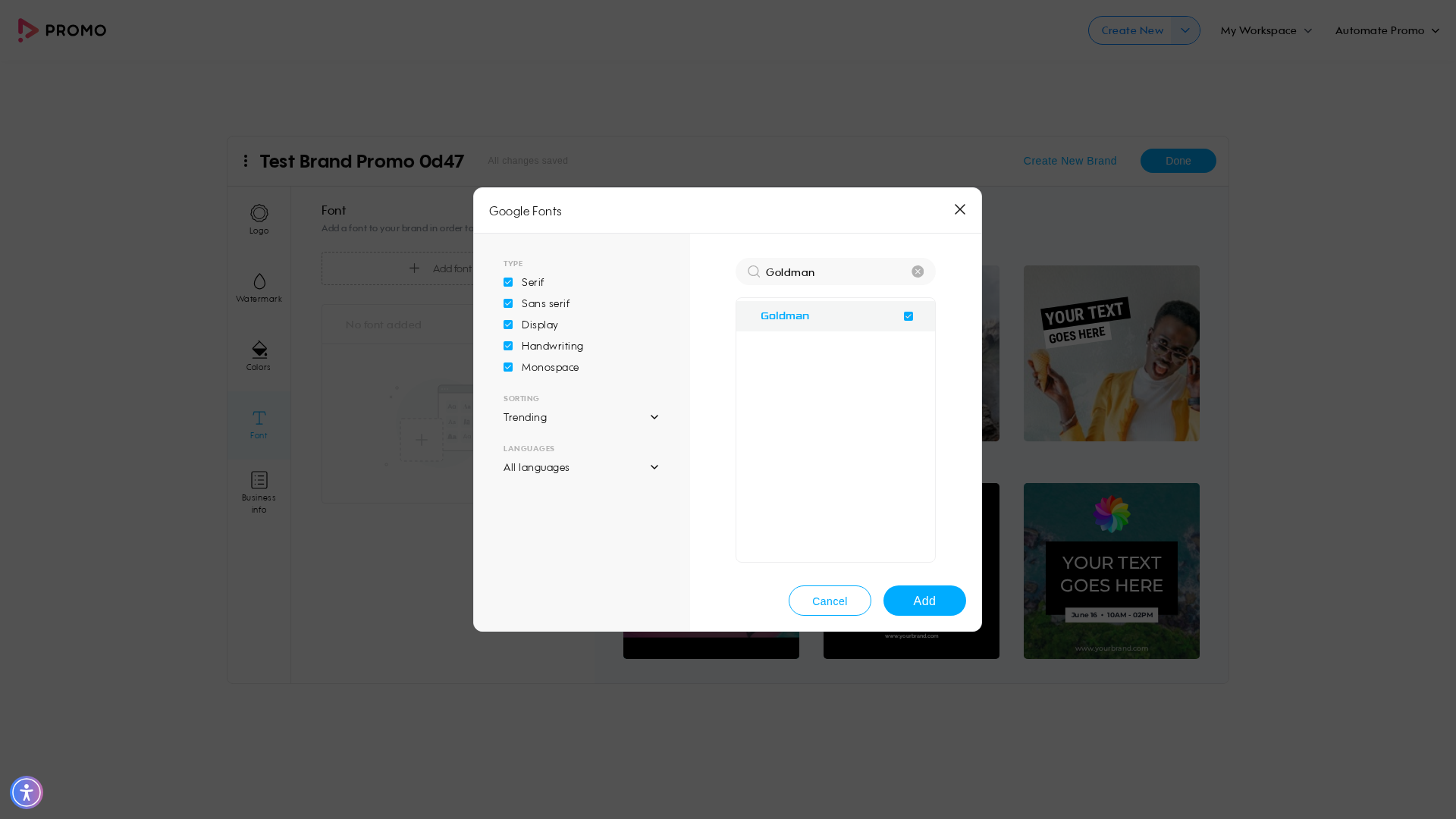
self = <tests.test_web_brand_manager.TestWebBrandManager object at 0x7fcdab7d74f0> login_page = <pages.login_page.LoginPage object at 0x7fcdab7d7b20> create_page = <pages.create_page.CreatePage object at 0x7fcdab7d68f0> editor_page = <pages.editor_page.EditorPage object at 0x7fcdab7d5330> publish_page = <pages.publish_page.PublishPage object at 0x7fcdab7d5360> brand_manager_page = <pages.brand_manager_page.BrandManagerPage object at 0x7fcdab96ce20> base_url = 'https://promo.com' def test_w19_brand_manager_basic( self, login_page: LoginPage, create_page: CreatePage, editor_page: EditorPage, publish_page: PublishPage, brand_manager_page: BrandManagerPage, base_url, ): """ W19 Verify Brand Manager Functionalities Basic Flow: 1. Login → go to Brand Manager → clean up any existing brands 2. Create a brand with name only via wizard 3. Add brand components: logo, color, Google font, business info → save 4. Create a new video project → search 'summer' → customize → verify editor 5. Apply the saved brand in the editor 6. Publish and verify render 7. Return to Brand Manager → clean up the test brand """ brand_name = brand_name_generate() full_brand_info = {**brand_info_data, "color": green_color} login_page.login_directly(base_url, general_mail(), get_password()) brand_manager_page.navigate_to_brand_manager(base_url) brand_manager_page.delete_all_brands() brand_manager_page.create_brand_name_only(brand_name) > brand_manager_page.add_brand_components(brand_logo_path, brand_name, full_brand_info) tests/test_web_brand_manager.py:93: _ _ _ _ _ _ _ _ _ _ _ _ _ _ _ _ _ _ _ _ _ _ _ _ _ _ _ _ _ _ _ _ _ _ _ _ _ _ _ _ pages/brand_manager_page.py:101: in add_brand_components self.page.locator(self.FONT_SUBMIT_BTN).click() /usr/local/lib/python3.10/
self = <tests.test_web_brand_manager.TestWebBrandManager object at 0x7fcdab7d74f0> login_page = <pages.login_page.LoginPage object at 0x7fcdab7d7b20> create_page = <pages.create_page.CreatePage object at 0x7fcdab7d68f0> editor_page = <pages.editor_page.EditorPage object at 0x7fcdab7d5330> publish_page = <pages.publish_page.PublishPage object at 0x7fcdab7d5360> brand_manager_page = <pages.brand_manager_page.BrandManagerPage object at 0x7fcdab96ce20> base_url = 'https://promo.com' def test_w19_brand_manager_basic( self, login_page: LoginPage, create_page: CreatePage, editor_page: EditorPage, publish_page: PublishPage, brand_manager_page: BrandManagerPage, base_url, ): """ W19 Verify Brand Manager Functionalities Basic Flow: 1. Login → go to Brand Manager → clean up any existing brands 2. Create a brand with name only via wizard 3. Add brand components: logo, color, Google font, business info → save 4. Create a new video project → search 'summer' → customize → verify editor 5. Apply the saved brand in the editor 6. Publish and verify render 7. Return to Brand Manager → clean up the test brand """ brand_name = brand_name_generate() full_brand_info = {**brand_info_data, "color": green_color} login_page.login_directly(base_url, general_mail(), get_password()) brand_manager_page.navigate_to_brand_manager(base_url) brand_manager_page.delete_all_brands() brand_manager_page.create_brand_name_only(brand_name) > brand_manager_page.add_brand_components(brand_logo_path, brand_name, full_brand_info) tests/test_web_brand_manager.py:93: _ _ _ _ _ _ _ _ _ _ _ _ _ _ _ _ _ _ _ _ _ _ _ _ _ _ _ _ _ _ _ _ _ _ _ _ _ _ _ _ pages/brand_manager_page.py:101: in add_brand_components self.page.locator(self.FONT_SUBMIT_BTN).click() /usr/local/lib/python3.10/
📸 Failure Screenshot:
×
![]()