20
Passed
3
Failed
0
Skipped
Test Results (23 tests)
test_cbe01_cbe_service_chains_sanity[chromium-caption]
passed
⏱️ Duration: 17.18s
test_cbe01_cbe_service_chains_sanity[chromium-linebreak]
passed
⏱️ Duration: 19.94s
test_cbe01_cbe_service_chains_sanity[chromium-music]
passed
⏱️ Duration: 12.33s
test_cbe01_cbe_service_chains_sanity[chromium-outro_values]
passed
⏱️ Duration: 17.90s
test_cbe01_cbe_service_chains_sanity[chromium-remove_scene]
passed
⏱️ Duration: 11.93s
test_cbe01_cbe_service_chains_sanity[chromium-text_color]
passed
⏱️ Duration: 16.45s
test_cbe01_cbe_service_chains_sanity[chromium-text_font]
failed
⏱️ Duration: 75.32s
❌ Error:
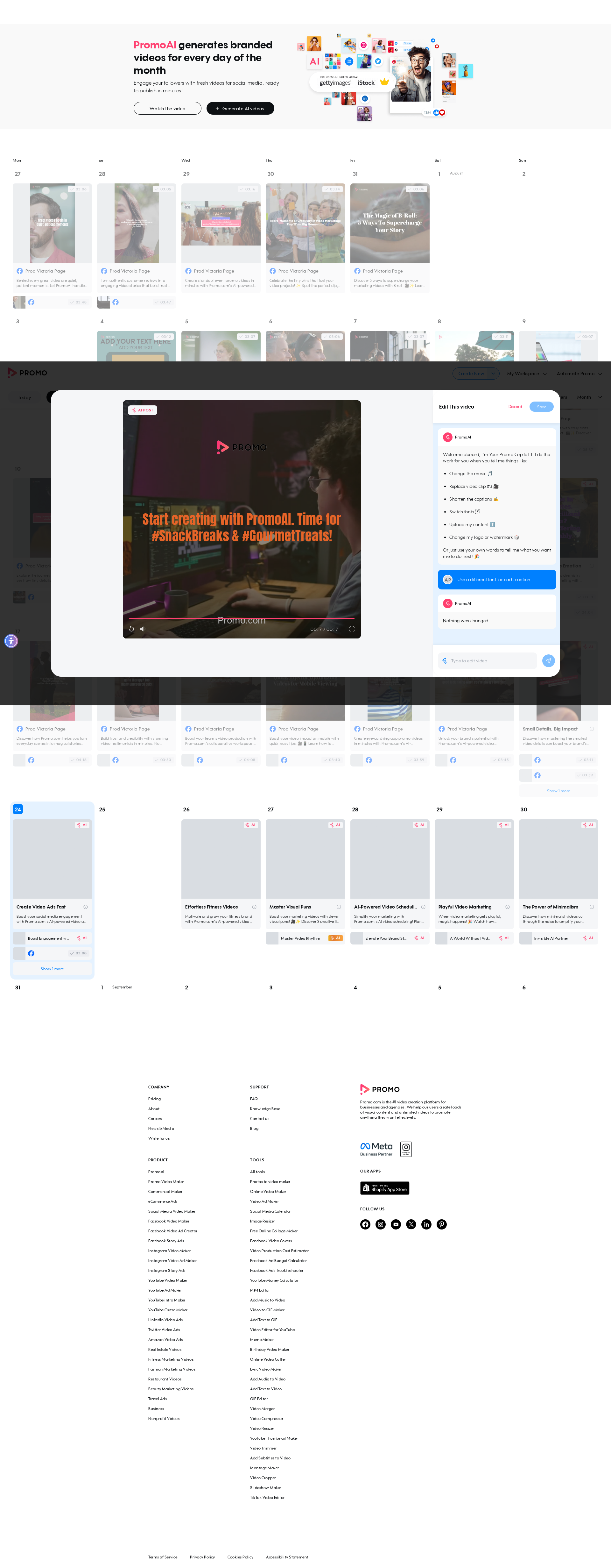
self = <tests.test_chat_based_editor.TestChatBasedEditor object at 0x7fcc834ccdf0> login_page = <pages.login_page.LoginPage object at 0x7fcc82912e90> autopilot_page = <pages.autopilot_page.AutopilotPage object at 0x7fcc829138e0> base_url = 'https://promo.com', prompt_key = 'text_font' @pytest.mark.skip_smoke @pytest.mark.parametrize("prompt_key", [ "caption", "linebreak", "music", "outro_values", "remove_scene", "text_color", "text_font", "logo", "text_position", "translation", "add_scene", "change_watermark", ]) def test_cbe01_cbe_service_chains_sanity( self, login_page, autopilot_page, base_url, prompt_key ): """ CBE01 CBE service chains sanity Login as AI user → open Planner → ensure AI posts exist → open 1st post → open CBE → send prompt → verify AI response → verify save enabled → verify discard popup → save video. """ login_page.login_directly(base_url, email_ai, get_password()) autopilot_page.go_to_planner(base_url) autopilot_page.ensure_ai_posts_exist() autopilot_page.open_ai_post(1) autopilot_page.open_cbe() autopilot_page.send_cbe_prompt_and_wait(CBE_PROMPTS[prompt_key]) # text_font / text_position are known to be slower on the backend to # apply and enable Save (documented flaky report in migration_log.md); # give them extra headroom instead of the default 30s. save_timeout = 60_000 if prompt_key in ("text_font", "text_position") else 30_000 > autopilot_page.verify_cbe_save_enabled(timeout=save_timeout) tests/test_chat_based_editor.py:102: _ _ _ _ _ _ _ _ _ _ _ _ _ _ _ _ _ _ _ _ _ _ _ _ _ _ _ _ _ _ _ _ _ _ _ _ _ _ _ _ self = <pages.autopilot_page.AutopilotPage object at 0x7fcc829138e0> timeout = 60000 def verify_cbe_save_enabled(self, timeout: int = 30_000): """ Veri
self = <tests.test_chat_based_editor.TestChatBasedEditor object at 0x7fcc834ccdf0> login_page = <pages.login_page.LoginPage object at 0x7fcc82912e90> autopilot_page = <pages.autopilot_page.AutopilotPage object at 0x7fcc829138e0> base_url = 'https://promo.com', prompt_key = 'text_font' @pytest.mark.skip_smoke @pytest.mark.parametrize("prompt_key", [ "caption", "linebreak", "music", "outro_values", "remove_scene", "text_color", "text_font", "logo", "text_position", "translation", "add_scene", "change_watermark", ]) def test_cbe01_cbe_service_chains_sanity( self, login_page, autopilot_page, base_url, prompt_key ): """ CBE01 CBE service chains sanity Login as AI user → open Planner → ensure AI posts exist → open 1st post → open CBE → send prompt → verify AI response → verify save enabled → verify discard popup → save video. """ login_page.login_directly(base_url, email_ai, get_password()) autopilot_page.go_to_planner(base_url) autopilot_page.ensure_ai_posts_exist() autopilot_page.open_ai_post(1) autopilot_page.open_cbe() autopilot_page.send_cbe_prompt_and_wait(CBE_PROMPTS[prompt_key]) # text_font / text_position are known to be slower on the backend to # apply and enable Save (documented flaky report in migration_log.md); # give them extra headroom instead of the default 30s. save_timeout = 60_000 if prompt_key in ("text_font", "text_position") else 30_000 > autopilot_page.verify_cbe_save_enabled(timeout=save_timeout) tests/test_chat_based_editor.py:102: _ _ _ _ _ _ _ _ _ _ _ _ _ _ _ _ _ _ _ _ _ _ _ _ _ _ _ _ _ _ _ _ _ _ _ _ _ _ _ _ self = <pages.autopilot_page.AutopilotPage object at 0x7fcc829138e0> timeout = 60000 def verify_cbe_save_enabled(self, timeout: int = 30_000): """ Veri
📸 Failure Screenshot:
test_cbe01_cbe_service_chains_sanity[chromium-logo]
passed
⏱️ Duration: 11.32s
test_cbe01_cbe_service_chains_sanity[chromium-text_position]
failed
⏱️ Duration: 67.37s
❌ Error:
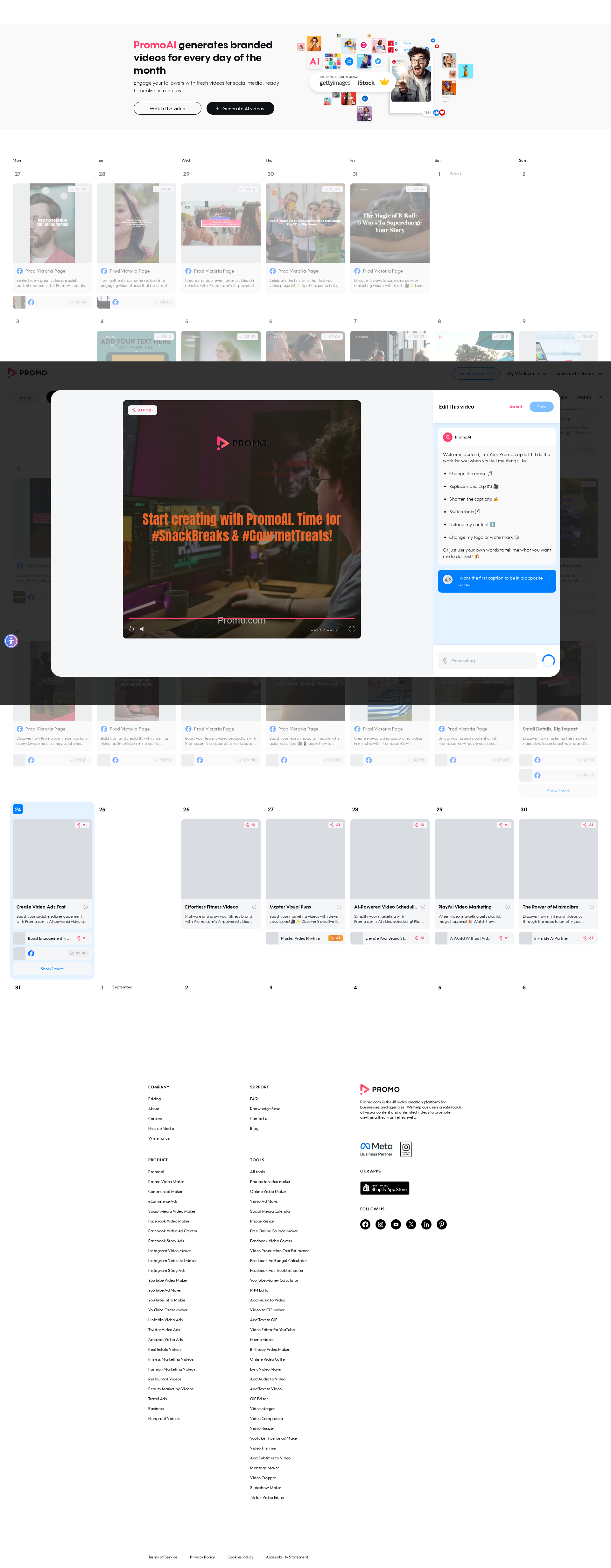
self = <tests.test_chat_based_editor.TestChatBasedEditor object at 0x7fcc834ccf10> login_page = <pages.login_page.LoginPage object at 0x7fcc80d7d750> autopilot_page = <pages.autopilot_page.AutopilotPage object at 0x7fcc80d7e6e0> base_url = 'https://promo.com', prompt_key = 'text_position' @pytest.mark.skip_smoke @pytest.mark.parametrize("prompt_key", [ "caption", "linebreak", "music", "outro_values", "remove_scene", "text_color", "text_font", "logo", "text_position", "translation", "add_scene", "change_watermark", ]) def test_cbe01_cbe_service_chains_sanity( self, login_page, autopilot_page, base_url, prompt_key ): """ CBE01 CBE service chains sanity Login as AI user → open Planner → ensure AI posts exist → open 1st post → open CBE → send prompt → verify AI response → verify save enabled → verify discard popup → save video. """ login_page.login_directly(base_url, email_ai, get_password()) autopilot_page.go_to_planner(base_url) autopilot_page.ensure_ai_posts_exist() autopilot_page.open_ai_post(1) autopilot_page.open_cbe() > autopilot_page.send_cbe_prompt_and_wait(CBE_PROMPTS[prompt_key]) tests/test_chat_based_editor.py:97: _ _ _ _ _ _ _ _ _ _ _ _ _ _ _ _ _ _ _ _ _ _ _ _ _ _ _ _ _ _ _ _ _ _ _ _ _ _ _ _ self = <pages.autopilot_page.AutopilotPage object at 0x7fcc80d7e6e0> prompt = 'I want the first caption to be in a opposite corner' def send_cbe_prompt_and_wait(self, prompt: str): """ Types a prompt in the chat input, sends it, then waits for the AI response and asserts no error message is shown. The CBE chat history persists on the post across sessions, so on a post that has already been through prior prompts (e.g. test_cbe01's chained parametrized runs against the same post) the pa
self = <tests.test_chat_based_editor.TestChatBasedEditor object at 0x7fcc834ccf10> login_page = <pages.login_page.LoginPage object at 0x7fcc80d7d750> autopilot_page = <pages.autopilot_page.AutopilotPage object at 0x7fcc80d7e6e0> base_url = 'https://promo.com', prompt_key = 'text_position' @pytest.mark.skip_smoke @pytest.mark.parametrize("prompt_key", [ "caption", "linebreak", "music", "outro_values", "remove_scene", "text_color", "text_font", "logo", "text_position", "translation", "add_scene", "change_watermark", ]) def test_cbe01_cbe_service_chains_sanity( self, login_page, autopilot_page, base_url, prompt_key ): """ CBE01 CBE service chains sanity Login as AI user → open Planner → ensure AI posts exist → open 1st post → open CBE → send prompt → verify AI response → verify save enabled → verify discard popup → save video. """ login_page.login_directly(base_url, email_ai, get_password()) autopilot_page.go_to_planner(base_url) autopilot_page.ensure_ai_posts_exist() autopilot_page.open_ai_post(1) autopilot_page.open_cbe() > autopilot_page.send_cbe_prompt_and_wait(CBE_PROMPTS[prompt_key]) tests/test_chat_based_editor.py:97: _ _ _ _ _ _ _ _ _ _ _ _ _ _ _ _ _ _ _ _ _ _ _ _ _ _ _ _ _ _ _ _ _ _ _ _ _ _ _ _ self = <pages.autopilot_page.AutopilotPage object at 0x7fcc80d7e6e0> prompt = 'I want the first caption to be in a opposite corner' def send_cbe_prompt_and_wait(self, prompt: str): """ Types a prompt in the chat input, sends it, then waits for the AI response and asserts no error message is shown. The CBE chat history persists on the post across sessions, so on a post that has already been through prior prompts (e.g. test_cbe01's chained parametrized runs against the same post) the pa
📸 Failure Screenshot:
test_cbe01_cbe_service_chains_sanity[chromium-translation]
passed
⏱️ Duration: 14.12s
test_cbe01_cbe_service_chains_sanity[chromium-add_scene]
passed
⏱️ Duration: 24.67s
test_cbe01_cbe_service_chains_sanity[chromium-change_watermark]
passed
⏱️ Duration: 11.04s
test_cbe02_cbe_should_work_in_all_ratios[chromium-wide]
passed
⏱️ Duration: 25.03s
test_cbe02_cbe_should_work_in_all_ratios[chromium-vertical]
passed
⏱️ Duration: 21.32s
test_cbe03_replace_a_clip[chromium-stock_video]
passed
⏱️ Duration: 14.73s
test_cbe03_replace_a_clip[chromium-stock_photo]
passed
⏱️ Duration: 26.86s
test_cbe03_replace_a_clip[chromium-uploaded_video]
passed
⏱️ Duration: 15.08s
test_cbe03_replace_a_clip[chromium-uploaded_photo]
passed
⏱️ Duration: 15.43s
test_cbe04_upload_via_filestack_url[chromium-video]
passed
⏱️ Duration: 26.67s
test_cbe04_upload_via_filestack_url[chromium-photo]
passed
⏱️ Duration: 16.07s
test_cbe05_voice_changes_not_possible_for_non_narrated_videos[chromium]
passed
⏱️ Duration: 9.84s
test_cbe06_upload_via_filestack_facebook_page[chromium]
passed
⏱️ Duration: 25.47s
test_cbe07_change_intro_amazon_product_video[chromium]
failed
⏱️ Duration: 458.51s
❌ Error:
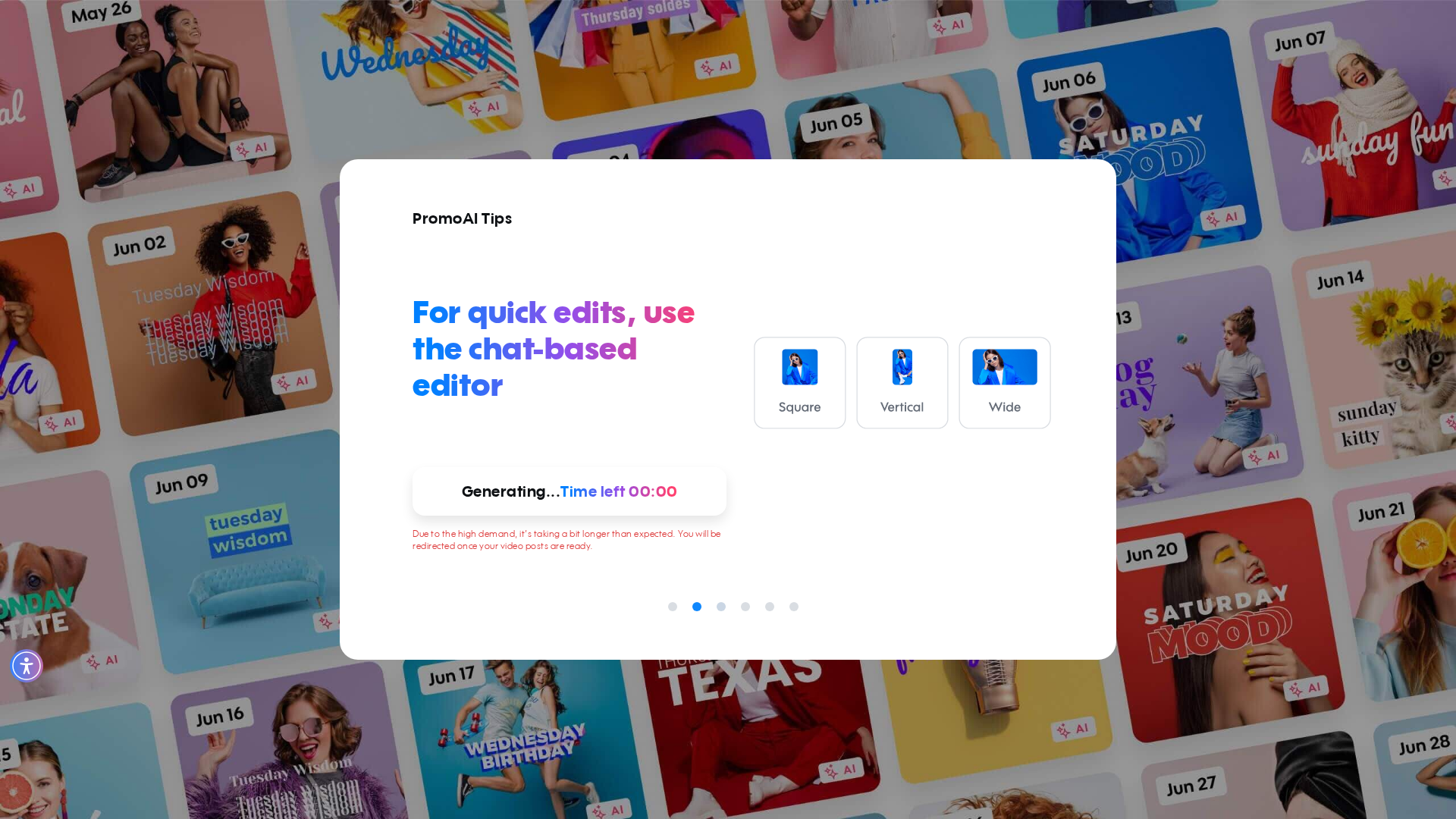
self = <tests.test_chat_based_editor.TestChatBasedEditor object at 0x7fcc834d3d60> page = <Page url='https://promo.com/planner/promoai?term=https%3A%2F%2Fwww.amazon.com%2Fdp%2FB00JXQ06X8&flow=video-settings&g...on_source=Homepage&ai_video_type=ECOMMERCE_ITEM&ai_session_id=0d0ef0c2-bdcc-47dc-8edb-e2e00ec2ccac&auto_generate=true'> base_url = 'https://promo.com' def test_cbe07_change_intro_amazon_product_video( self, page, base_url ): """ CBE07 Change the intro for an Amazon product video. Homepage TID=0 → Amazon URL → video settings → new account → skip survey → wait for generation (skip tutorial when it appears) → open first post → verify CBE + voice settings present → change intro via 'amazon_intro' → verify save enabled → open advanced settings → edit script → save → confirm regeneration → wait for regeneration → verify save enabled → save. """ main_page = MainPage(page) signup_page = SignUpPage(page) autopilot_page = AutopilotPage(page) main_page.go_to_homepage_with_tid(base_url, "0") main_page.provide_autopilot_input(amazon_product) main_page.click_video_settings_next() main_page.assert_ai_flow_login_loader() signup_page.fill_signup_form_in_ai_flow(fullname, random_password) signup_page.skip_survey() # Wait up to 5 minutes for the skip-tutorial button to appear. # Generation screen shows this button once backend processing starts; # the window is generous because the first run after signup can be slow. from playwright.sync_api import TimeoutError as PlaywrightTimeoutError try: autopilot_page.page.locator(autopilot_page.AI_GENERATOR_SKIP_VIDEO).wait_for( state="visible", timeout=300_000 ) autopilot_page.page.locator(autopilot_page.AI_GENERATOR_SKIP_VIDEO).click() autopilot_page.page.wait_for_url(
self = <tests.test_chat_based_editor.TestChatBasedEditor object at 0x7fcc834d3d60> page = <Page url='https://promo.com/planner/promoai?term=https%3A%2F%2Fwww.amazon.com%2Fdp%2FB00JXQ06X8&flow=video-settings&g...on_source=Homepage&ai_video_type=ECOMMERCE_ITEM&ai_session_id=0d0ef0c2-bdcc-47dc-8edb-e2e00ec2ccac&auto_generate=true'> base_url = 'https://promo.com' def test_cbe07_change_intro_amazon_product_video( self, page, base_url ): """ CBE07 Change the intro for an Amazon product video. Homepage TID=0 → Amazon URL → video settings → new account → skip survey → wait for generation (skip tutorial when it appears) → open first post → verify CBE + voice settings present → change intro via 'amazon_intro' → verify save enabled → open advanced settings → edit script → save → confirm regeneration → wait for regeneration → verify save enabled → save. """ main_page = MainPage(page) signup_page = SignUpPage(page) autopilot_page = AutopilotPage(page) main_page.go_to_homepage_with_tid(base_url, "0") main_page.provide_autopilot_input(amazon_product) main_page.click_video_settings_next() main_page.assert_ai_flow_login_loader() signup_page.fill_signup_form_in_ai_flow(fullname, random_password) signup_page.skip_survey() # Wait up to 5 minutes for the skip-tutorial button to appear. # Generation screen shows this button once backend processing starts; # the window is generous because the first run after signup can be slow. from playwright.sync_api import TimeoutError as PlaywrightTimeoutError try: autopilot_page.page.locator(autopilot_page.AI_GENERATOR_SKIP_VIDEO).wait_for( state="visible", timeout=300_000 ) autopilot_page.page.locator(autopilot_page.AI_GENERATOR_SKIP_VIDEO).click() autopilot_page.page.wait_for_url(
📸 Failure Screenshot:
×
![]()